Do free image tools keep your photo’s location? We tested 29.
By Venkat Dixit Kallepalli · Tested · 27 tools measured, 2 could not be tested
Photos from a phone usually store where they were taken. We made a test photo that says it was taken at the Eiffel Tower, ran it through 27 free online tools, twice each, and read every piece of hidden information in the file that came back.
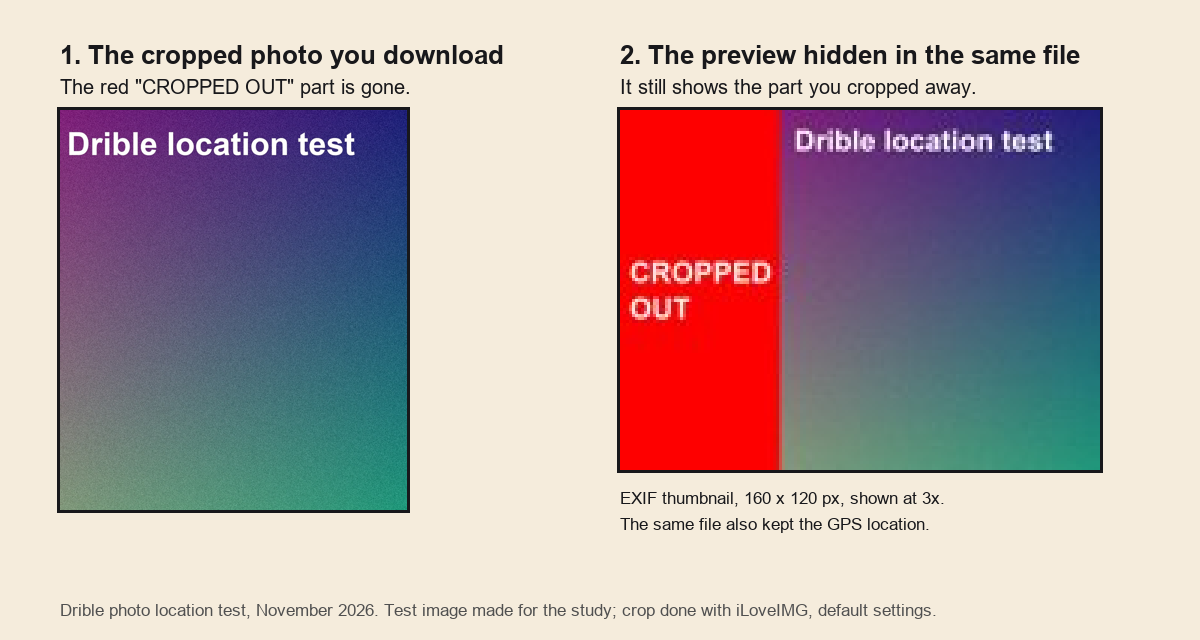
The pattern was clear: every tool that kept the location had uploaded the photo to its server first, and every tool that worked in the browser removed it. Two crop tools also kept a small preview of the full, uncropped photo inside the file.
tools gave back a file that still says where the photo was taken
of those had uploaded the photo to their server first
tools that work in the browser removed the location and everything else
crop tools kept a hidden preview of the part you cropped away
What we found
- 9 of 23 tools kept the location. FreeConvert compress, iLoveIMG resize, ResizePixel resize, Simple Image Resizer, iLoveIMG crop, ResizePixel crop, heictojpg.com, CloudConvert, Convertio gave back a file with the Eiffel Tower coordinates still inside, both in the standard EXIF block and in a second copy (XMP).
- It was all or nothing. Every tool that kept the location also kept the date and time the photo was taken, the camera make and model, the camera serial number and the city name. Every tool that removed it removed all of them.
- Cropping did not remove the cropped part. iLoveIMG crop, ResizePixel crop kept a small preview image inside the cropped file, and that preview still shows the whole original photo, including the part you cut off (see the picture below).
- The browser tools were clean. All 9 tools that worked without uploading, including Optimizilla, CompressJPEG, Squoosh, imgkilo, removed the location and every other detail, because they draw the picture again and save a new file.
- The same company can give different answers. iLoveIMG’s compressor removed the location, but its resize and crop tools kept it. FreeConvert’s compressor kept it, but its HEIC to JPG converter removed it. One page, Convertio, says so plainly: its FAQ states that GPS coordinates are preserved.
- Most metadata removers upload your photo to do it. All 4 removal tools we tested did remove everything, but 3 of them (VerExif, IMGonline, metadata2go) sent the photo to their server first.
Compress a photo
| Site | What the tool page says | Location in the downloaded file | Photo uploaded |
|---|---|---|---|
| iLoveIMGiloveimg.com | Does not say where it runs | Removed | Yesto iloveimg.com |
| FreeConvertfreeconvert.com | Processed on their servers“all files are protected with 256-bit SSL encryption and deleted automatically after 8 hours.” | Keptwith date taken, camera, serial number and city | Yesto freeconvert.com |
| Optimizillaimagecompressor.com | Works in your browser“This tool runs entirely in your browser” | Removed | No, it stayed in the browser |
| CompressJPEGcompressjpeg.com | Works in your browser“Your images never leave your device.” | Removed | No, it stayed in the browser |
| Squooshsquoosh.app | Works in your browser“Images never leave your device since Squoosh does all the work locally.” | Removed | No, it stayed in the browser |
| imgkiloimgkilo.com | Works in your browser“Nothing is uploaded.” | Removed | No, it stayed in the browser |
| compressimage.iocompressimage.io | Works in your browser“Your images are never uploaded to a server, so it is fast and completely private.” | Removed | No, it stayed in the browser |
| imageonline.ioimageonline.io | Works in your browser“Free, fast and private: your images are never uploaded anywhere.” | Removed | No, it stayed in the browser |
| Compressocompresso.io | Works in your browser“All compression happens in your browser.” | Removed | No, it stayed in the browser |
| Drible(us)drible.co | Works in your browser“Compression runs in your browser.” | Removed | No, it stayed in the browser |
Resize a photo
| Site | What the tool page says | Location in the downloaded file | Photo uploaded |
|---|---|---|---|
| iLoveIMGiloveimg.com | Does not say where it runs | Keptwith date taken, camera, serial number and city | Yesto iloveimg.com |
| ResizePixelresizepixel.com | Does not say where it runs | Keptwith date taken, camera, serial number and city | Yesto resizepixel.com |
| Simple Image Resizersimpleimageresizer.com | Processed on their servers“Images are uploaded securely”The site offers a separate EXIF Metadata Remover tool. | Keptwith date taken, camera, serial number and city | Yesto simpleimageresizer.com |
| BIRMEbirme.net | Works in your browser“BIRME processes images locally in your browser.” | Removed | No, it stayed in the browser |
| Drible(us)drible.co | Works in your browser“It is loaded in your browser, not uploaded.” | Removed | No, it stayed in the browser |
Crop a photo
| Site | What the tool page says | Location in the downloaded file | Photo uploaded |
|---|---|---|---|
| iLoveIMGiloveimg.com | Does not say where it runs | Keptwith date taken, camera, serial number and cityand a preview of the uncropped photo | Yesto iloveimg.com |
| ResizePixelresizepixel.com | Processed on their servers“To crop an image online, begin by uploading it to ResizePixel's website.” | Keptwith date taken, camera, serial number and cityand a preview of the uncropped photo | Yesto resizepixel.com |
| Drible(us)drible.co | Works in your browser“It opens in your browser.” | Removed | No, it stayed in the browser |
Convert an iPhone photo (HEIC) to JPG
| Site | What the tool page says | Location in the downloaded file | Photo uploaded |
|---|---|---|---|
| heictojpg.comheictojpg.com | Processed on their servers“Your files are deleted immediately after conversion.” | Keptwith date taken, camera, serial number and city | Yesto Amazon S3 file storage |
| CloudConvertcloudconvert.com | Does not say where it runs | Keptwith date taken, camera, serial number and city | Yesto cloudconvert.com |
| FreeConvertfreeconvert.com | Processed on their servers“we upload your files over a secure HTTPS connection and delete them automatically after 8 hours.”On metadata: “Strip the image of any profiles, EXIF, and comments to reduce size”The HEIC page has a Strip Metadata option; we used the default settings. | Removed | Yesto freeconvert.com |
| Convertioconvertio.co | Processed on their servers“Your uploaded HEIC photos are deleted immediately after conversion.”On metadata: “EXIF data such as camera model, GPS coordinates, and date taken is preserved during the HEIC to JPG conversion process.” | Keptwith date taken, camera, serial number and city | Yesto convertio.me |
| Drible(us)drible.co | Works in your browser“Your photos are never uploaded” | Removed | No, it stayed in the browser |
Remove metadata
| Site | What the tool page says | Location in the downloaded file | Photo uploaded |
|---|---|---|---|
| VerExifverexif.com | Does not say where it runsOn metadata: “Check and remove Exif data online” | Removed | Yesto verexif.com |
| IMGonlineimgonline.com.ua | Does not say where it runsOn metadata: “Removing of EXIF and all other metadata from JPG image online” | Removed | Yesto com.ua |
| EXIF Removerexifremover.com | Works in your browser“your files never leave your device.”On metadata: “View, inspect and remove EXIF metadata from images, videos and PDFs.” | Removed | No, it stayed in the browser |
| metadata2gometadata2go.com | Does not say where it runsOn metadata: “Delete EXIF, GPS, and author data from photos, PDFs, videos, and documents.” | Removed | Yesto metadata2go.com |
Sites we could not test
We did not try to get around any of these:
- TinyPNG: returned an error for every file in our test browser ("Something went wrong"), including a plain photo without metadata.
- Compressor.io: blocked our automated test browser (block page).
- TheXifer: rejected our test browser with a reCAPTCHA error.
How to check a photo before you share it
- Windows: right-click the file, Properties, Details. A GPS section means the location is stored.
- Mac: open the photo in Preview, then Tools, Show Inspector. A GPS tab means the location is stored.
- iPhone: open the photo in Photos and swipe up. A map means the location is stored.
- To remove it without uploading the photo, use a tool that works in your browser, such as Drible’s Compress Image, Resize Image, Crop Image or HEIC to JPG, then check the new file again.
How we tested
- The test photo was made for the study: a 2000 x 1500 pixel picture with no real person or place in it. Its hidden data said it was taken at the Eiffel Tower (48.85837, 2.29448), with a date, a camera name, a serial number, a city, and a small preview image of the whole picture. An iPhone-style HEIC copy carried the same data.
- Each site’s own tool page, used as a visitor would, with its default settings: no account, no sign-in, a fresh browser profile for every run, from India, on 12 November 2026, 13 November 2026, 15 November 2026. Each site ran twice; a result counts only when both runs agree, and they did for every site. CloudConvert’s free daily limit allowed one conversion a day, so its two runs were on different days.
- The crop jobs kept the right two thirds of the picture, so the cropped file should no longer show the red “CROPPED OUT” panel. Where a tool shows the original and the result side by side, we downloaded the result.
- We read every field of each downloaded file with exiftool. Chrome’s network log recorded whether the photo was sent to a server, the same method as our file upload test.
- Two checks confirmed the reading works both ways: the untouched test photo showed every field, and a copy saved without metadata showed none.
- Cookie banners: we only ever clicked “reject” or “necessary only”, never “accept”.
What this test does not show
- Keeping metadata is not wrong in itself. Photographers often want it kept.
- Default settings only. Some sites offer a setting to remove or keep metadata, which can change the result.
- A test photo, not a real one. Real phones write extra fields, which tools may handle differently.
- We read the file that came back. What a server keeps after an upload is not visible from outside; deletion times are quoted from each page.
- One location, one browser, these dates. Sites change.
Questions
How can I see whether my photo still has its location?
On Windows, right-click the file, choose Properties, then the Details tab, and look for the GPS section. On a Mac, open the photo in Preview, choose Tools, then Show Inspector, and look for a GPS tab. On an iPhone, open the photo in Photos and swipe up: a map means the location is stored.
Is it wrong for a tool to keep the location?
Not by itself. Photographers and photo libraries rely on it. It matters when you share the result publicly or send it to someone who should not know where you live, and when the tool does not tell you that the location stays in the file.
Does Drible remove the location?
Yes. Drible image tools redraw the picture in your browser and save a new file, which carries no location, date, camera details or preview. This test measured that for Compress, Resize, Crop and HEIC to JPG, and the photo was not uploaded.
My site is in the table and the result is wrong. What now?
Tell us through the contact page with the site and what changed. We re-run the test, update the table and note the date of the change.
Data, citing and corrections
The full results are free to reuse under CC BY 4.0, with a link to this page: CSV and JSON. Each row has the site, job, whether each detail was kept, whether the cropped part survived in a preview, and whether the photo was uploaded. The picture above may be reused with the same credit.
Related: which free file tools upload your file and how Drible handles files. To see new tests in Google, you can add Drible as a preferred source on Google.